
 Posted by
 By Oretta Croushore, Property Manager for Home Rental Services
Our modern world is full of apps, websites, and portals. I love apps because they keep me from remembering how to find websites and tend to be more condensed. There’s some apps I use almost daily like Spotify, my bank, and YouTube. Others I use so infrequently that is seems like I have to update them every time I do open them.
Daily, monthly, or somewhere in between, I like having my apps on my phone. It gives me the illusion of being organized. It probably also makes me appear like an e-hoarder because I almost never delete apps. (I just recently decided it was safe to delete Bed, Bath, and Beyond and Joann’s since they are no longer in business.)
At HRS, we are always looking for ways to make necessary information more accessible to renters as well as to investor clients. Anyone who has recently signed a new lease knows you are inundated with so much information in a short period of time. Add that to the stress and chaos of the actual move, and it can make a person feel like they have no idea which end is up.
I use the “star” feature in Gmail when I get an email that has important information I know I will need later. I hate digging through my decades worth of emails to find the one from last week with all the important details about the event I’m attending. I also never delete emails or texts. (See previous statement about being an e-hoarder.)
The HRS Renter Portal
One of the resources we have to help renters keep their leasing life organized is the renter portal. Is there an app for that, Oretta? I am glad you asked because there is! Just search for AppFolio Online Portal app in the app store on your device. (Apple App Store version | Google Play Store version)

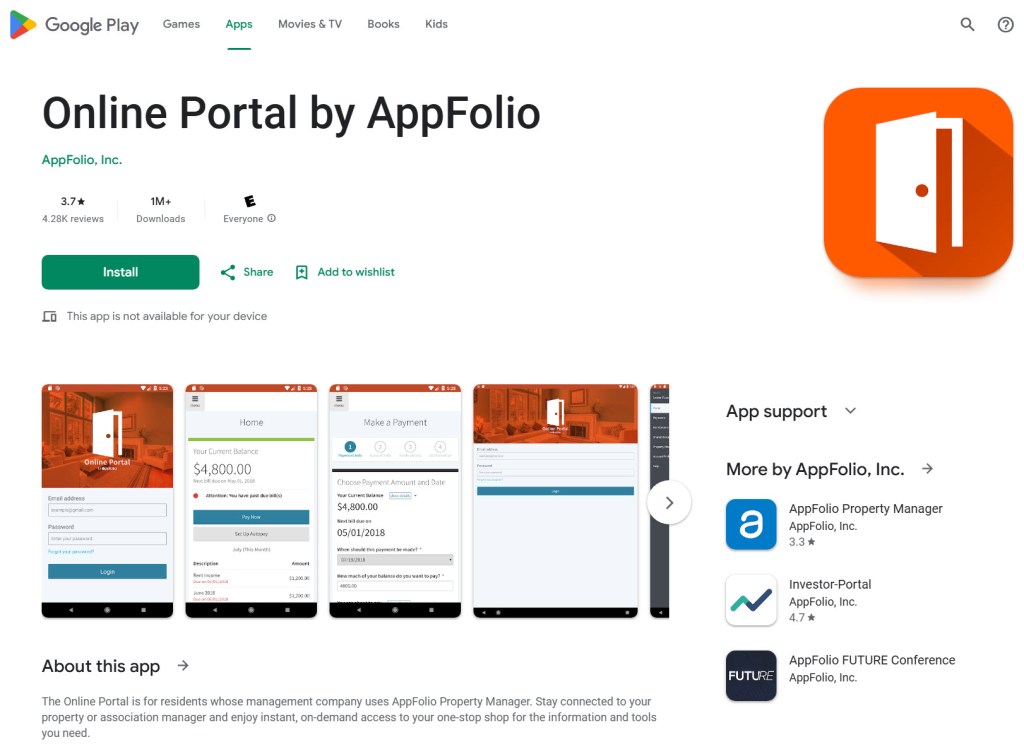
A portal or it’s app are only useful if they are inclusive and user friendly. Let’s take a little tour of AppFolio’s renter portal!
Home
This is the landing page when you log into your portal. The main feature on this tab is a snapshot of your current balance.
Payments
The current balance box is here as well. You will also see a button to Make a Payment or Set up Autopay. Whether you choose to set up an autopayment or make a single payment each month, it’s free to make a payment through the portal as long as you use an echeck. You will enter your routing number and account number, easy peasy. If you use a card, there are fees administered by AppFolio, which are disclosed at the time of making a payment.
Did you know that HRS pays extra to AppFolio to ensure you always have a free way to pay your rent? About a year ago, AppFolio changed their fee structure and added a surcharge on all online payments, even an echeck. Many property managers were outraged as this is something we didn’t feel should be sprung on renters out of the blue. We know the convenience of online payments and the ability to do it anywhere, anytime is important to many people.
There is a section labeled Account Ledger. This takes you to a view of your full account ledger from the first charge to the most recent payment. The other section on this tab shows your past payments. The last area in this tab is a great resource to see payments you’ve made without weeding through the full ledger. So, when you wake up in the middle of the night, in a panic that you don’t remember if you paid your rent, you can confirm your fears in just a few clicks.
Contact Us
Forgot to save our number in your phone? No problem. You can find it here. You can also find the text number, which comes into the software. An important note about texting, these messages are only monitored during business hours. The messages come into our AppFolio software and not to a personal phone. You never have to feel bad about sending us a text at 3 am, you won’t wake us. On the flip side, if you have an emergency, always call the main line and follow the prompts to get to emergency maintenance.
Shared Documents
Sharing is caring! You will find the signed PDF of your lease agreements here. In the past few months, we decided to utilize this area for more documents. The letter with the prorate information you receive at move-in also has a lot of important housekeeping items. We know a renter might not need to know all that information on move-in day but they will need it soon. Just a few clickity clicks to the portal and voila!
Insurance
I’m going to throw you a curve ball here. I’ve told you all the great ways to use the other tabs. Now, I am going to tell you not to use this one. HRS has partnered with Second Nature to offer our Resident Benefit Package. One of the many benefits of the RBP is renters insurance. A renter may choose to keep their own policy in place, the policy just has to be approved by Second Nature.
Uploading your insurance information into your portal feels intuitive. However, it does not start the approval process. Instead, you will submit the required information through this link. (Review the Resident Benefit Package Addendum in your lease for more information.)
So, just roll on past that insurance tab in your portal. Pretend you don’t see it. Don’t make eye contact! Pretend it’s the guy selling siding at Costco when you just want to get some samples.
Property Details
I don’t mean to be judgy, but I’m not sure what the point of this tab is. It has your address and a repeat of HRS’s contact information. Hopefully, you already know your address. Even if you don’t, it’s in the upper right hand corner on your portal.
Account Profile
Your contact information is here. If you need to update a phone number or email, you can do that here. You can change your password on this tab. I’m assuming you aren’t changing your password because you can’t remember it or you wouldn’t have been able to get logged in to see this tab. If you did forget your password, you have already gone through the shame of clicking on “forgot password.”
Other sections of this tab allow you to set your contact preferences for recurring payment reminders, see your saved payment methods, opt in to two factor authentication, and choose your preferred language.
Help
Can’t find what you are looking for or figure out how to do something? Click help to view the Renter Portal Overview. If all that fails, you can always give us a call for assistance. We are happy to walk you through the Renter Portal app!
Is there something you wish was easily available to you on your portal? A resource you would like to have? We would love to hear your feedback on ways we can improve the handling of information. Send us an email to propertymanagers@home4rent.com. Now, slip into your jammies, cuddle up on the couch with your fur baby, and check out that Renter Portal app!
 Home Rental Services Blog